Apache ActiveMQ
JMS queues and topics, installing Apache ActiveMQ, and connecting GlassFish to it through the ActiveMQ resource adapter.
4 min readUpdated
Apache ActiveMQ is an open source message broker. This note explains the two JMS messaging models, installs ActiveMQ on macOS, and connects a GlassFish server to the broker by deploying the ActiveMQ resource adapter and creating a connection factory and a queue.
The configuration below uses ActiveMQ 5.15.10 and the javax.jms API of Java EE. Newer ActiveMQ releases also support Jakarta Messaging (jakarta.jms); check the ActiveMQ documentation for the resource adapter that matches your server.
What JMS is
Java Message Service (JMS) is the Java API for sending and receiving messages between applications or components through a broker. It was created by Sun Microsystems and continues under the Eclipse Foundation as Jakarta Messaging. Messages carry data such as event notifications and service requests between programs rather than between users.
Producers and consumers only share the name of a destination and the message format. They do not call each other directly, so they are more loosely coupled than with RMI, where the caller needs the remote method’s name and signature.
JMS has two messaging models:
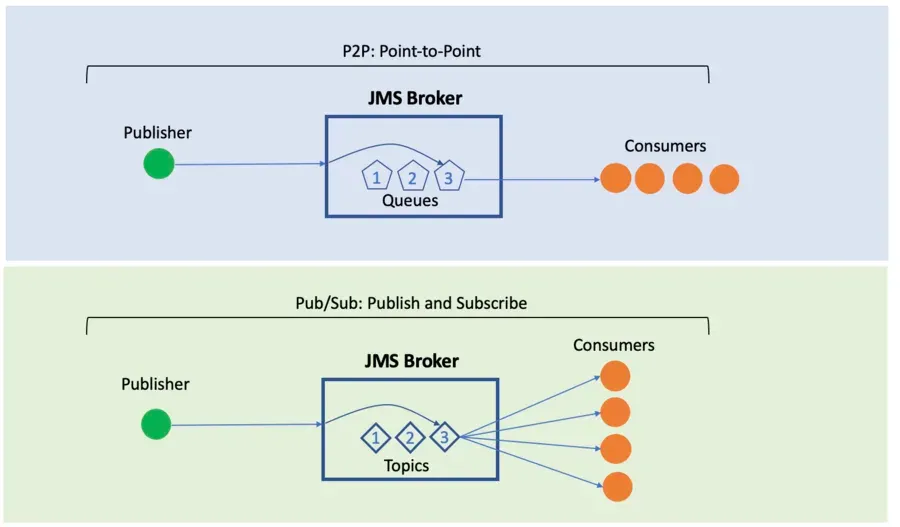
- Queue (point-to-point): each message is delivered to exactly one consumer, even if several consumers listen on the queue. Compare a one-to-one chat: one client sends, one receives.
- Topic (publish/subscribe): each message is delivered to every subscriber of the topic. Compare a group chat: one client sends, all connected clients receive.
The diagram below shows both: on a queue the broker hands each message to one consumer, on a topic it copies each message to all consumers.
What ActiveMQ is
ActiveMQ is the broker that JMS clients connect to. ActiveMQ 5.x (ActiveMQ Classic) fully implements JMS 1.1. A JMS application needs a running broker, which acts as the JMS server.
Install ActiveMQ on macOS
Install ActiveMQ with Homebrew:
brew install activemqStart it now and at every login as a launchd service:
brew services start activemqOr start it only when you need it, in the background:
activemq startTo run the broker in the foreground with its log in the terminal, which is useful when debugging:
activemq consoleWhen the broker starts, its web console is available at http://127.0.0.1:8161. The default username and password are admin and admin; change them on any machine reachable from the network.
Deploy the ActiveMQ resource adapter to GlassFish
GlassFish connects to ActiveMQ through a JCA resource adapter, packaged as a RAR file. Download it from Maven Central:
wget https://repo1.maven.org/maven2/org/apache/activemq/activemq-rar/5.15.10/activemq-rar-5.15.10.rar -O activemq-rar-5.15.10.rarDeploy it to GlassFish as a connector:
asadmin deploy --type rar activemq-rar-5.15.10.rarThe deployed adapter is named after the file, activemq-rar-5.15.10; the following commands refer to it by that name.
Configure the connection to the broker
The resource adapter needs to know where the broker is. The key properties and their values for an out-of-the-box ActiveMQ installation on the same machine:
ServerUrl:tcp://127.0.0.1:61616UserName:adminPassword:admin
Then create a connection pool, a connection factory with a JNDI name, and an admin object for each queue. You can do this with asadmin or with a glassfish-resources.xml file in the application.
With asadmin
# Resource adapter configurationasadmin create-resource-adapter-config --property 'ServerUrl=tcp\://127.0.0.1\:61616:UserName=admin:Password=admin' activemq-rar-5.15.10
# JMS connection poolasadmin create-connector-connection-pool --raname activemq-rar-5.15.10 --connectiondefinition javax.jms.ConnectionFactory --ping true --isconnectvalidatereq true jms/myConnectionPool
# Connection factory: JNDI name for the poolasadmin create-connector-resource --poolname jms/myConnectionPool jms/myConnectionFactory
# Queue: JNDI name jms/TESTQ for the broker queue TESTQasadmin create-admin-object --raname activemq-rar-5.15.10 --restype javax.jms.Queue --property PhysicalName=TESTQ jms/TESTQasadminseparates properties with colons, so the colons inside the URL are escaped with a backslash. The single quotes stop the shell from removing the backslashes.--ping truechecks the pool when it is created;--isconnectvalidatereq truevalidates each connection before handing it out.PhysicalNameis the queue’s name in the broker; the last argument is its JNDI name in GlassFish.
With glassfish-resources.xml
The same resources can ship with the application. Put the elements below inside the <resources> root element of glassfish-resources.xml (in WEB-INF of a WAR or META-INF of an EAR). This example names the queue myAMQ.
The resource adapter configuration:
<resource-adapter-config name="activemq-rar-5.15.10" thread-pool-ids="thread-pool-1" resource-adapter-name="activemq-rar-5.15.10"> <property name="ServerUrl" value="tcp://localhost:61616"/> <property name="UserName" value="admin"/> <property name="Password" value="admin"/> <property name="UseInboundSession" value="false"/></resource-adapter-config>The connection pool, with all pool settings spelled out:
<connector-connection-pool associate-with-thread="false" connection-creation-retry-attempts="0" connection-creation-retry-interval-in-seconds="10" connection-definition-name="javax.jms.ConnectionFactory" connection-leak-reclaim="false" connection-leak-timeout-in-seconds="0" fail-all-connections="false" idle-timeout-in-seconds="300" is-connection-validation-required="true" lazy-connection-association="false" lazy-connection-enlistment="false" match-connections="true" max-connection-usage-count="0" max-pool-size="32" max-wait-time-in-millis="60000" name="jms/myConnectionPool" ping="true" pool-resize-quantity="2" pooling="true" resource-adapter-name="activemq-rar-5.15.10" steady-pool-size="8" validate-atmost-once-period-in-seconds="0"/>The connection factory that applications look up:
<connector-resource enabled="true" jndi-name="jms/myConnectionFactory" object-type="user" pool-name="jms/myConnectionPool"> <description>My Connection Factory</description> <property name="Name" value="myFactory"/></connector-resource>The queue:
<admin-object-resource enabled="true" jndi-name="jms/myAMQ" object-type="user" res-adapter="activemq-rar-5.15.10" res-type="javax.jms.Queue"> <description>My JMS Queue</description> <property name="Name" value="myAMQ"/> <property name="PhysicalName" value="myAMQ"/></admin-object-resource>Applications then inject the factory and the queue by their JNDI names, for example @Resource(lookup = "jms/myConnectionFactory") ConnectionFactory and @Resource(lookup = "jms/myAMQ") Queue.
References
- Apache ActiveMQ
- ActiveMQ Classic documentation
- ActiveMQ resource adapter
- Java EE 6 tutorial: basic JMS concepts
- Java EE 8 tutorial: using the JMS API in Java EE applications
- Java EE 8 tutorial: sending and receiving messages using a simple web application
- Getting started with Java Messaging Service (JMS)
- Asynchronous receiver in Java Messaging Service (JMS)
- Java Message Service tutorial (HowToDoInJava)
- Stack Overflow: JMS vs ActiveMQ bean and resource configuration
- ActiveMQ with JMS queues and topics (Tomitribe)