GCC
How GCC turns a C file into a program in four stages, preprocessing, compiling, assembling and linking, and how to stop after each one.
2 min readUpdated
Compilation translates source code, the code we write, into object code: a sequence of machine language instructions. When you run gcc main.c, GCC actually runs four tools one after the other, and each stage’s output is the next stage’s input:
- The preprocessor expands
#includeand#definedirectives and removes comments. - The compiler translates the preprocessed C into assembly code for the target processor.
- The assembler turns the assembly code into an object file (
.o) with machine code. - The linker combines the object files with the libraries they use into an executable.
The diagram shows the flow from the source file to the executable.
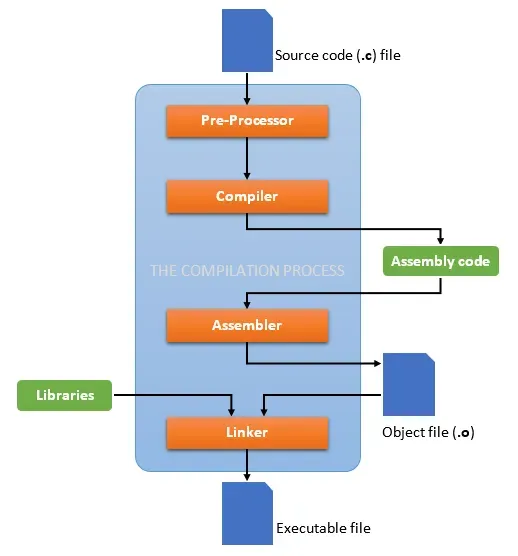
GCC can stop after any stage, which helps when you want to see what a macro expands to or what code the compiler generates. The examples use a single file main.c.
Preprocess only
-E runs only the preprocessor and writes the result to standard output:
gcc -E main.cSave it to a file with -o; .i is the usual extension for preprocessed C:
gcc -E main.c -o main.iThe output is long, because the contents of every included header are copied in.
Compile to assembly
-S stops after the compiler and writes the assembly code to main.s:
gcc -S main.cAssemble to an object file
-c compiles and assembles, but does not link. The result is the object file main.o:
gcc -c main.cObject files are what larger projects build per source file; only the last step links them together.
Link into an executable
Without any of these options, GCC runs all four stages. The executable is called a.out by default:
gcc main.c./a.out-o gives the executable a name:
gcc main.c -o my_program./my_programSeveral source or object files are linked into one program by listing them all. Libraries are added with -l; for example, programs that use math.h functions need -lm on Linux:
gcc main.c util.c -o my_program -lmTo keep the intermediate files of every stage (.i, .s and .o) from a normal build, add -save-temps.