Jakarta Faces (JSF)
Jakarta Faces (JSF) recipes: WebSocket push, validators with injection, resource handling, component binding, java.time and scopes.
13 min readUpdated
Jakarta Faces, formerly JavaServer Faces (JSF), is the component-based web framework of Jakarta EE. Pages are written as Facelets (XHTML) templates and backed by CDI beans; the framework keeps component state on the server and handles form submission, validation and Ajax.
This note collects working recipes: server-to-browser push over WebSocket (added in JSF 2.3), validators that use dependency injection, passing extra values to a validator, resource locations, component binding, java.time conversion and an overview of bean scopes.
Package and namespace names by version
The examples use JSF 2.3 names (javax.faces, xmlns.jcp.org). Jakarta Faces 3.0 moved the API to the jakarta.faces package, and Faces 4.0 (Jakarta EE 10) renamed the remaining “JSF” names. When you run the examples on a newer version, translate the names with this table:
| Item | JSF 2.3 | Faces 3.0 | Faces 4.0 |
|---|---|---|---|
| Java package | javax.faces.* |
jakarta.faces.* |
jakarta.faces.* |
| Context parameters | javax.faces.* |
jakarta.faces.* |
jakarta.faces.* |
| Push endpoint | /javax.faces.push/* |
/jakarta.faces.push/* |
/jakarta.faces.push/* |
| JavaScript API | jsf (jsf.js) |
jsf (jsf.js) |
faces (faces.js) |
| Facelets namespaces | http://xmlns.jcp.org/jsf/html etc. |
same | jakarta.faces.html, jakarta.faces.core, jakarta.faces.facelets |
| Pass-through element prefix | xmlns:jsf="http://xmlns.jcp.org/jsf" |
same | xmlns:faces="jakarta.faces" |
@ManagedBean |
deprecated | deprecated | removed, use CDI @Named |
Push messages over WebSocket
JSF 2.3 added native WebSocket support: a backing bean can push messages to the browser without polling and without a separate WebSocket library. The server side sends through an injected PushContext; the page opens the connection with <f:websocket>.
Enable the endpoint
The WebSocket endpoint is off by default. Enable it with a context parameter in web.xml:
<context-param> <param-name>javax.faces.ENABLE_WEBSOCKET_ENDPOINT</param-name> <param-value>true</param-value></context-param>Send a message to a channel
Inject a PushContext with the @Push qualifier. The channel name is the field name (helloChannel) unless you set it with @Push(channel = "..."). send() delivers the message to every browser connected to that channel.
@ViewScoped@Named("helloBean")public class HelloBean implements Serializable {
    private static final Logger LOG = Logger.getLogger(HelloBean.class.getName());
    @Inject    @Push    PushContext helloChannel;
    String message;
    public void sendMessage() {        LOG.log(Level.INFO, "send push message");        this.sendPushMessage("hello");    }
    public void sendMessage2() {        this.sendPushMessage(this.message);    }
    private void sendPushMessage(Object message) {        helloChannel.send("" + message + " at " + LocalDateTime.now());    }
    public String getMessage() {        return message;    }
    public void setMessage(String message) {        this.message = message;    }}
The page subscribes to the channel with <f:websocket channel="helloChannel" onmessage="onMessage">. The JavaScript function named in onmessage receives the message, the channel name and the raw event. The three buttons show a standard h:commandButton, one that also submits the input field, and a plain HTML5 <button> turned into a JSF component with the jsf: pass-through attributes.
<!DOCTYPE html><html lang="en" xmlns="http://www.w3.org/1999/xhtml" xmlns:jsf="http://xmlns.jcp.org/jsf" xmlns:ui="http://xmlns.jcp.org/jsf/facelets" xmlns:f="http://xmlns.jcp.org/jsf/core" xmlns:h="http://xmlns.jcp.org/jsf/html"> <h:head> <title>JSF 2.3: WebSocket sample</title> <script> function onMessage(message, channel, event) { console.log('jsf push message::' + message + ", channel ::" + channel + ", event::" + event); document.getElementById("message").innerHTML = message; } </script> </h:head> <h:body> <h1>JSF 2.3: Hello WebSocket</h1> <div id="message" /> <hr /> <h:form id="form"> <div> <h:commandButton id="sendMessage" type="submit" action="#{helloBean.sendMessage()}" value="Send Message"> <f:ajax /> </h:commandButton> </div> <div> <h:outputLabel for="messageInput" value="Say hi to JSF WebSocket" /> <h:inputText id="messageInput" value="#{helloBean.message}"/> </div> <h:panelGroup layout="block" id="messageFromInputBox"> Input text is :: #{helloBean.message} </h:panelGroup> <div> <h:commandButton id="sendMessage2" action="#{helloBean.sendMessage2()}" value="Send Message from Input Box"> <f:ajax execute="@form" render="messageFromInputBox" /> </h:commandButton> </div> <div> <button jsf:id="sendMessage3" jsf:action="#{helloBean.sendMessage2()}"> Send Message from Input Box (HTML5 button) <f:ajax execute="@form" render="messageFromInputBox" /> </button> </div> </h:form> <f:websocket channel="helloChannel" onmessage="onMessage" /> </h:body></html>Choose the channel scope or target users
<f:websocket> has a scope attribute with the values application, session and view. A message sent to an application-scoped channel reaches every open page; a session-scoped channel reaches only the pages of the same HTTP session; a view-scoped channel reaches only the current view.
The user attribute identifies the user behind a connection. It can be a user ID or any serializable object that stands for a user, for example the logged-in user’s name. PushContext.send(message, user) then delivers to that user only, and send(message, users) with a collection delivers to several users.
The bean below declares one PushContext per case:
@ViewScoped@Named("scopeBean")public class ScopeBean implements Serializable {
    @Inject    @Push    PushContext applicationChannel;
    @Inject    @Push    PushContext sessionChannel;
    @Inject    @Push    PushContext viewChannel;
    @Inject    @Push    PushContext userChannel;
    public void pushToApplicationChannel() {        applicationChannel.send("sent to applicationChannel at ::" + LocalDateTime.now());    }
    public void pushToSessionChannel() {        sessionChannel.send("sent to sessionChannel at ::" + LocalDateTime.now());    }
    public void pushToViewChannel() {        viewChannel.send("sent to viewChannel at ::" + LocalDateTime.now());    }
    public void pushToUserChannel() {        userChannel.send("sent to userChannel at ::" + LocalDateTime.now(), "user");    }
    public void pushToMultiUsersChannel() {        userChannel.send("sent to userChannel at ::" + LocalDateTime.now(), Arrays.asList("user", "hantsy"));    }}
The page opens one connection per channel and appends each message to a list. For the demo it subscribes to userChannel as two users; in a real page, user would come from the security context.
<!DOCTYPE html><html lang="en"      xmlns="http://www.w3.org/1999/xhtml"      xmlns:jsf="http://xmlns.jcp.org/jsf"      xmlns:ui="http://xmlns.jcp.org/jsf/facelets"      xmlns:f="http://xmlns.jcp.org/jsf/core"      xmlns:h="http://xmlns.jcp.org/jsf/html">    <h:head>        <title>JSF 2.3: WebSocket sample</title>        <script>            function onMessage(message, channel, event) {                var m = "message:" + message + ", channel:" + channel + ", event:" + event;                console.log(m);                var ul = document.getElementById("messages");                var li = document.createElement("li");                li.appendChild(document.createTextNode(m));                ul.appendChild(li);            }        </script>    </h:head>    <h:body>        <h1>JSF 2.3: WebSocket scopes</h1>        <ul id="messages">        </ul>        <hr />        <h:form id="form">            <div>                <h:commandButton                    id="pushToApplicationChannel"                    action="#{scopeBean.pushToApplicationChannel()}" value="pushToApplicationChannel">                    <f:ajax />                </h:commandButton>            </div>            <div>                <h:commandButton                    id="pushToSessionChannel"                    action="#{scopeBean.pushToSessionChannel()}" value="pushToSessionChannel">                    <f:ajax />                </h:commandButton>            </div>            <div>                <h:commandButton                    id="pushToViewChannel"                    action="#{scopeBean.pushToViewChannel()}" value="pushToViewChannel">                    <f:ajax />                </h:commandButton>            </div>            <div>                <h:commandButton                    id="pushToUserChannel"                    action="#{scopeBean.pushToUserChannel()}" value="pushToUserChannel">                    <f:ajax />                </h:commandButton>            </div>            <div>                <h:commandButton                    id="pushToMultiUsersChannel"                    action="#{scopeBean.pushToMultiUsersChannel()}" value="pushToMultiUsersChannel">                    <f:ajax />                </h:commandButton>            </div>        </h:form>
        <f:websocket channel="applicationChannel" scope="application" onmessage="onMessage" />        <f:websocket channel="sessionChannel" scope="session" onmessage="onMessage" />        <f:websocket channel="viewChannel" scope="view" onmessage="onMessage" />        <f:websocket channel="userChannel" user="hantsy" onmessage="onMessage" />        <f:websocket channel="userChannel" user="user" onmessage="onMessage" />    </h:body></html>
Open the page in two browsers (two sessions) to see the difference between the scopes.
Listen to open and close events
On the server, JSF fires a CDI WebsocketEvent when a connection opens or closes. Observe it with the @Opened and @Closed qualifiers, for example to track who is online:
@ApplicationScopedpublic class WebsocketObserver {
    private static final Logger LOG = Logger.getLogger(WebsocketObserver.class.getName());
    public void onOpen(@Observes @Opened WebsocketEvent opened) {        LOG.log(Level.INFO, "event opened::{0}", opened);    }
    public void onClose(@Observes @Closed WebsocketEvent closed) {        LOG.log(Level.INFO, "event closed::{0}", closed);    }}
In the browser, <f:websocket> has onopen and onclose attributes next to onmessage. With connected="false" the page does not connect on load; you open and close the connection yourself with jsf.push.open(clientId) and jsf.push.close(clientId), where clientId is the id of the <f:websocket> component (faces.push.open in Faces 4.0).
The backing bean only sends a message:
@ViewScoped@Named("eventBean")public class EventBean implements Serializable {
    @Inject    @Push    PushContext eventChannel;
    public void sendMessage() {        eventChannel.send("event message was sent at::" + LocalDateTime.now());    }}
The page logs all three client events. The onclose handler receives a close code: -1 means the browser does not support WebSocket, 1000 is a normal close (for example after the session or view expired), anything else is an error.
<!DOCTYPE html><html lang="en"      xmlns="http://www.w3.org/1999/xhtml"      xmlns:jsf="http://xmlns.jcp.org/jsf"      xmlns:ui="http://xmlns.jcp.org/jsf/facelets"      xmlns:f="http://xmlns.jcp.org/jsf/core"      xmlns:h="http://xmlns.jcp.org/jsf/html">    <h:head>        <title>JSF 2.3: WebSocket sample</title>        <script>            function onMessage(message, channel, event) {                console.log('Client onMessage listener: message: ' + message + ', channel:' + channel + ", event:" + event);                document.getElementById("message").innerHTML = message;            }            function onOpen(channel) {                console.log('Client onOpen listener:  channel:' + channel);            }            function onClose(code, channel, event) {                console.log('Client onClose listener: code: ' + code + ', channel:' + channel + ", event:" + event);
                if (code === -1) {                    // WebSocket not supported by the client.                } else if (code === 1000) {                    // Normal close (expired session or view).                } else {                    // Abnormal close (an error).                }            }        </script>    </h:head>    <h:body>        <h1>JSF 2.3: WebSocket events</h1>        <div id="message" />        <hr />        <h:form id="form">            <div>                <h:commandButton onclick="jsf.push.open('eventChannel')" value="Open Event Channel">                    <f:ajax />                </h:commandButton>                <h:commandButton onclick="jsf.push.close('eventChannel')" value="Close Event Channel">                    <f:ajax />                </h:commandButton>            </div>            <h:commandButton                id="sendMessage"                type="submit"                action="#{eventBean.sendMessage}" value="Send Message">                <f:ajax />            </h:commandButton>        </h:form>
        <f:websocket id="eventChannel"                     channel="eventChannel"                     onopen="onOpen"                     onclose="onClose"                     onmessage="onMessage"                     connected="false"/>    </h:body></html>
Trigger Ajax from a push message
A push message can also start an Ajax request, so the server decides when a part of the page is re-rendered. There are three ways:
- Nest
<f:ajax event="...">in<f:websocket>. When the pushed message equals theeventname, the Ajax request runs and renders the given components. - Add a
listenerto that<f:ajax>to run a bean method first. - Use
<h:commandScript>(new in JSF 2.3), which turns a bean action into a named JavaScript function, and set that function name as theonmessagehandler.
The bean pushes the event names (ajaxEvent, ajaxListenerEvent, onCommandScript) and records what happened in a list:
@ViewScoped@Named("ajaxBean")public class AjaxBean implements Serializable {
    private static final Logger LOG = Logger.getLogger(AjaxBean.class.getName());
    @Inject    @Push    PushContext ajaxChannel;
    @Inject    @Push    PushContext ajaxListenerChannel;
    @Inject    @Push    PushContext commandScriptChannel;
    private List<String> messages = new ArrayList<>();
    public void ajaxPushed(AjaxBehaviorEvent e) throws AbortProcessingException {        LOG.log(Level.INFO, "ajax pushed: " + e.toString());        messages.add("ajaxListenerEvent is sent at: " + LocalDateTime.now());    }
    public void commandScriptExecuted() {        LOG.log(Level.INFO, "commandScriptExecuted pushed.");        messages.add("commandScriptExecuted message is sent at: " + LocalDateTime.now());    }
    public void pushToAjaxChannel() {        messages.add("ajaxEvent is sent at: " + LocalDateTime.now());        ajaxChannel.send("ajaxEvent");    }
    public void pushToAjaxListenerChannel() {        ajaxListenerChannel.send("ajaxListenerEvent");    }
    public void pushToCommandScriptChannel() {        commandScriptChannel.send("onCommandScript");    }
    public List<String> getMessages() {        return messages;    }
    public void setMessages(List<String> messages) {        this.messages = messages;    }}
The page wires each channel to one of the three mechanisms. An <f:websocket> with a nested <f:ajax> must sit inside an <h:form>; all three re-render messagePanel.
<!DOCTYPE html><html lang="en"      xmlns="http://www.w3.org/1999/xhtml"      xmlns:jsf="http://xmlns.jcp.org/jsf"      xmlns:ui="http://xmlns.jcp.org/jsf/facelets"      xmlns:f="http://xmlns.jcp.org/jsf/core"      xmlns:h="http://xmlns.jcp.org/jsf/html">    <h:head>        <title>JSF 2.3: WebSocket sample</title>    </h:head>    <h:body>        <h1>JSF 2.3: WebSocket and Ajax</h1>        <h:panelGroup id="messagePanel" layout="block">            <ul>                <ui:repeat value="#{ajaxBean.messages}" var="m">                    <li>#{m}</li>                </ui:repeat>            </ul>        </h:panelGroup>
        <h:form id="form">            <h:commandButton                id="pushToAjaxChannel"                action="#{ajaxBean.pushToAjaxChannel()}"                value="pushToAjaxChannel">                <f:ajax/>            </h:commandButton>            <h:commandButton                id="pushToAjaxListenerChannel"                action="#{ajaxBean.pushToAjaxListenerChannel()}"                value="pushToAjaxListenerChannel">                <f:ajax/>            </h:commandButton>            <h:commandButton                id="pushToCommandScriptChannel"                action="#{ajaxBean.pushToCommandScriptChannel()}"                value="pushToCommandScriptChannel">                <f:ajax/>            </h:commandButton>        </h:form>
        <!-- 1. f:ajax nested in f:websocket -->        <h:form>            <f:websocket channel="ajaxChannel" scope="view">                <f:ajax event="ajaxEvent" render=":messagePanel" />            </f:websocket>        </h:form>
        <!-- 2. f:ajax with a listener -->        <h:form>            <f:websocket channel="ajaxListenerChannel" scope="view">                <f:ajax event="ajaxListenerEvent" listener="#{ajaxBean.ajaxPushed}" render=":messagePanel" />            </f:websocket>        </h:form>
        <!-- 3. h:commandScript as the onmessage handler -->        <f:websocket channel="commandScriptChannel" scope="view" onmessage="onCommandScript"/>        <h:form>            <h:commandScript name="onCommandScript" action="#{ajaxBean.commandScriptExecuted()}" render=":messagePanel"/>        </h:form>    </h:body></html>
Secure the push endpoint
JSF serves WebSocket connections on the endpoint /javax.faces.push/<channel> (/jakarta.faces.push/<channel> from Faces 3.0). Protect it like any other web resource with a security constraint in web.xml. This example lets only users with the USER role connect to the channel foo:
<security-constraint> <web-resource-collection> <web-resource-name>Restrict access to role USER.</web-resource-name> <url-pattern>/user/*</url-pattern> <url-pattern>/javax.faces.push/foo</url-pattern> </web-resource-collection> <auth-constraint> <role-name>USER</role-name> </auth-constraint></security-constraint>Inject dependencies into a validator
A class annotated only with @FacesValidator is created by JSF, not by the injection container, so @Inject, @EJB and @PersistenceContext fields stay null.
Since JSF 2.3, set managed = true and the validator becomes a CDI-managed instance that you can still reference by its validator ID:
@FacesValidator(value = "emailExistValidator", managed = true)public class EmailExistValidator implements Validator<String> {
    @Inject    private UserService userService;
    @Override    public void validate(FacesContext context, UIComponent component, String email) {        // ...    }}
The older approach, which also works with Spring, is to make the validator a managed bean itself: add CDI’s @Named (or Spring’s @Component) with a scope.
@Named@ApplicationScoped@FacesValidator("emailExistValidator")public class EmailExistValidator implements Validator { // ...}JSF’s own @ManagedBean was also used for this; it is deprecated in JSF 2.3 and removed in Faces 4.0. With this approach, reference the validator as a bean through EL, either as a method expression:
<h:inputText validator="#{emailExistValidator.validate}" />or as a component binding:
<f:validator binding="#{emailExistValidator}" />instead of the hardcoded validator ID, which would make JSF create its own, non-injected instance:
<h:inputText validator="emailExistValidator" /><f:validator validatorId="emailExistValidator" />Pass a second value to a validator
A validator receives only the value of its own component. To compare it with another value, pass that value as a component attribute with <f:attribute> and read it in the validator with component.getAttributes().
A common case is a unique code on an edit form: the new code must not belong to another record, but it may stay equal to the record’s current code. Validation runs before the model is updated, so an <f:attribute> bound to the same property still holds the stored (old) value. The input below is a PrimeFaces p:inputText; h:inputText works the same way.
<p:inputText id="code" value="#{controller.selectedRecord.code}" label="#{i18n['Code']}" placeholder="#{i18n['Code']}" validator="#{codeValidator.validate}"> <f:attribute name="oldOne" value="#{controller.selectedRecord.code}" /></p:inputText>The validator rejects an empty code and a code that another record already uses. isExistByCodeExceptItself is an application service method that ignores the record whose code is oldOne.
@Named@ApplicationScopedpublic class CodeValidator implements Validator<String> {
    @Inject    private Service service;
    @Override    public void validate(FacesContext context, UIComponent component, String code) throws ValidatorException {
        String oldOne = (String) component.getAttributes().get("oldOne");
        if (code == null || code.isEmpty()) {            FacesMessage msg = new FacesMessage("Invalid", "Invalid code");            msg.setSeverity(FacesMessage.SEVERITY_ERROR);            throw new ValidatorException(msg);        }
        if (service.isExistByCodeExceptItself(code, oldOne)) {            FacesMessage msg = new FacesMessage("Not available", "Code is already in use");            msg.setSeverity(FacesMessage.SEVERITY_ERROR);            throw new ValidatorException(msg);        }    }}
To validate several fields of the same bean together, JSF 2.3 also offers <f:validateWholeBean>, which runs a class-level Bean Validation constraint after the individual fields are validated.
Move the resource directory
Since JSF 2.0 the resource handler looks up resources (h:outputStylesheet, h:graphicImage, composite components) in two places:
/resourcesunder the web application root./META-INF/resourcesin JAR files.
Everything in the web root’s /resources folder can be downloaded directly by URL, which is not always wanted, especially for composite components. JSF 2.2 added the context parameter javax.faces.WEBAPP_RESOURCES_DIRECTORY to change the first location. This example moves it to /WEB-INF/resources, which JSF can read but browsers cannot request directly:
<context-param> <param-name>javax.faces.WEBAPP_RESOURCES_DIRECTORY</param-name> <param-value>/WEB-INF/resources</param-value></context-param>Reference images and fonts from CSS
Relative url(...) paths in a stylesheet break when JSF serves the stylesheet through its resource handler, because the URL of the stylesheet changes. Use the EL variable #{resource['library:name']} in the CSS instead; JSF evaluates EL in stylesheets that are loaded with <h:outputStylesheet>. library is the folder directly under the resource directory (default in this example) and name is the path inside it.
For example, the Glyphicons font declaration in Bootstrap 3’s bootstrap.css:
@font-face { font-family: 'Glyphicons Halflings'; src: url('../fonts/glyphicons-halflings-regular.eot'); src: url('../fonts/glyphicons-halflings-regular.eot?#iefix') format('embedded-opentype'), url('../fonts/glyphicons-halflings-regular.woff') format('woff'), url('../fonts/glyphicons-halflings-regular.ttf') format('truetype'), url('../fonts/glyphicons-halflings-regular.svg#glyphicons-halflingsregular') format('svg');}becomes:
@font-face { font-family: 'Glyphicons Halflings'; src: url('#{resource["default:bootstrap/fonts/glyphicons-halflings-regular.eot"]}'); src: url('#{resource["default:bootstrap/fonts/glyphicons-halflings-regular.eot?#iefix"]}') format('embedded-opentype'), url('#{resource["default:bootstrap/fonts/glyphicons-halflings-regular.woff"]}') format('woff'), url('#{resource["default:bootstrap/fonts/glyphicons-halflings-regular.ttf"]}') format('truetype'), url('#{resource["default:bootstrap/fonts/glyphicons-halflings-regular.svg#glyphicons-halflingsregular"]}') format('svg');}The same works for background-image: url('#{resource["default:images/logo.png"]}');.
Bind a component to a bean
The binding attribute binds the component instance itself, not its value, to a bean property:
<h:inputText binding="#{backingBean.inputText}" />The bean then has access to the whole UIComponent and all its properties, for example to change its style:
public HtmlInputText getInputText() { inputText.setStyle("color:red"); return inputText;}or to disable it depending on a bean property:
if (someBoolean) { inputText.setDisabled(true);}Note: Components belong to a single request. Bind them only to request-scoped beans; binding to a view-, session- or application-scoped bean shares component instances between requests and causes errors that are hard to trace. Most use cases are better solved with value expressions such as disabled="#{bean.someBoolean}".
Convert java.time values
JSF 2.3 added support for the JSR 310 java.time types to <f:convertDateTime>. Set type to localDate, localTime, localDateTime, offsetTime, offsetDateTime or zonedDateTime:
<h:outputText value="#{dateBean.localDate}"> <f:convertDateTime type="localDate" pattern="yyyy-MM-dd" /></h:outputText>Rendered with their default format, the six types look like this (time zone Asia/Shanghai):
LocalDate is :: 2017-11-13LocalTime is :: 19:32:44.115LocalDate Time is :: 2017-11-13T19:32:44.115OffsetTime is :: 19:32:44.131+08:00OffsetDateTime is :: 2017-11-13T19:32:44.131+08:00ZonedDate Time is :: 2017-11-13T19:32:44.131+08:00[Asia/Shanghai]The table maps the legacy date classes to their java.time replacements:
| Meaning | Legacy class | Modern class |
|---|---|---|
| Moment in UTC | java.util.Date, java.sql.Timestamp |
java.time.Instant |
| Moment with offset from UTC (hours-minutes-seconds) | none | java.time.OffsetDateTime |
Moment with time zone (Continent/Region) |
java.util.GregorianCalendar, javax.xml.datatype.XMLGregorianCalendar |
java.time.ZonedDateTime |
| Date and time of day without offset or zone (not a moment) | none | java.time.LocalDateTime |
Bean scopes
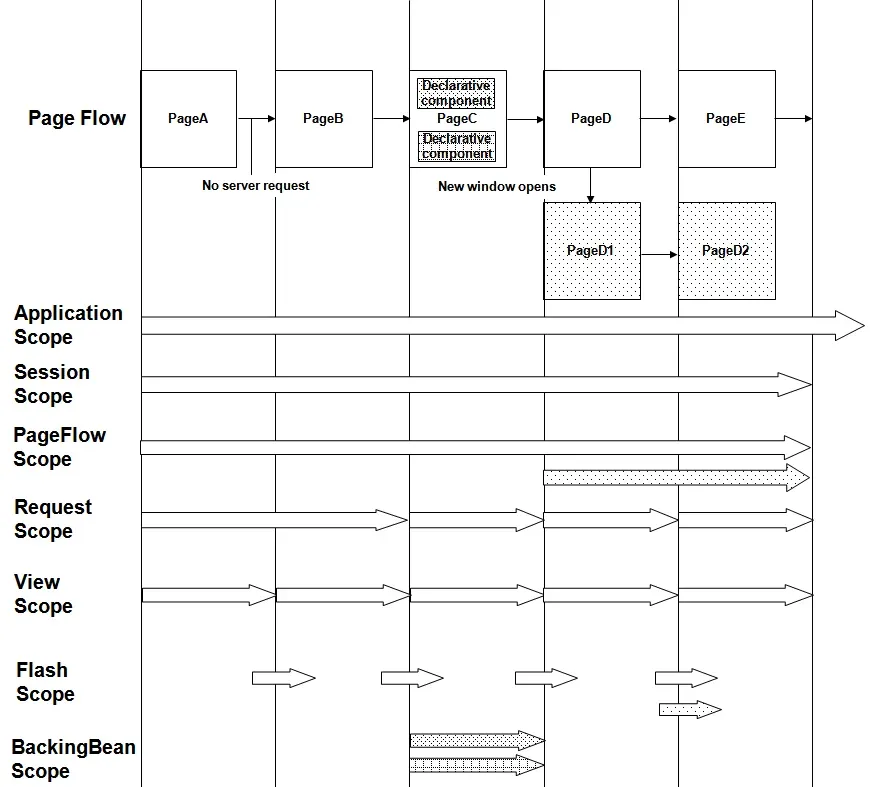
A bean’s scope decides how long one instance lives and who shares it. The standard CDI and Faces scopes, from shortest to longest:
@RequestScoped: one HTTP request.- Flash: survives exactly one redirect, accessed with
#{flash}; useful for messages after post-redirect-get. @ViewScoped: as long as the user stays on the same view (page) and posts back to it, including Ajax requests.@FlowScoped: across a defined group of pages (a Faces Flow).@SessionScoped: one user’s HTTP session.@ApplicationScoped: one instance for the whole application.
The diagram below shows these lifetimes over a sequence of pages. It uses Oracle ADF terminology, which adds a page flow scope (similar to a flow) and a backing bean scope for declarative components on top of the standard ones.
References
- What’s new in Faces 4.0 (BalusC)
- What’s new in JSF 2.3 (Arjan Tijms)
- Jakarta Faces specifications
- How to inject in @FacesValidator with @EJB, @PersistenceContext, @Inject, @Autowired (Stack Overflow)
- JSF doesn’t support cross-field validation, is there a workaround? (Stack Overflow)
- How to get the value of another component in a custom validator? (Stack Overflow)
- JSF 2.2: Configurable resource directory (JSFlive)