WildFly
Connect WildFly to PostgreSQL and MySQL: install the JDBC driver as a module, define datasources and fix WFLYJCA0047.
4 min readUpdated
WildFly is Red Hat’s open-source Jakarta EE application server. Applications reach a database through a datasource that the server manages, and the JDBC driver behind it is installed as a WildFly module.
This note shows how to install the PostgreSQL and MySQL drivers as modules, define plain and XA datasources in standalone-full.xml or with the CLI, and fix the “Connection is not valid” error. The examples use PostgreSQL driver 42.7.1 and the datasources:7.1 subsystem schema; keep the schema version that your own configuration file declares.
Connect WildFly to PostgreSQL
Download the PostgreSQL driver
Download a driver version that matches your Java and PostgreSQL versions (for example PostgreSQL JDBC 4.2 driver 42.7.1) from the PostgreSQL JDBC download page.
Install the driver as a module
Under [WILDFLY_HOME]/modules, create the directory org/postgresql/main and copy the JAR file into it:
mkdir -p [WILDFLY_HOME]/modules/org/postgresql/maincp postgresql-42.7.1.jar [WILDFLY_HOME]/modules/org/postgresql/main/Some guides put custom modules under modules/system/layers/base instead, next to WildFly’s own modules. Red Hat advises against this, because that directory holds the server’s own modules. See this JBoss community discussion.
In the same directory, create module.xml. It names the JAR and the modules the driver depends on:
<?xml version='1.0' encoding='UTF-8'?><module xmlns="urn:jboss:module:1.9" name="org.postgresql"> <resources> <resource-root path="postgresql-42.7.1.jar"/> </resources> <dependencies> <module name="javax.api"/> <module name="javax.transaction.api"/> </dependencies></module>On WildFly 27 and later (Jakarta EE 10), the transaction module is called jakarta.transaction.api; use that name instead of javax.transaction.api.
The result is this structure:
modules|-- org| `-- postgresql| `-- main| |-- module.xml| `-- postgresql-42.7.1.jar`-- systemAlternatively, the WildFly CLI creates the directory and module.xml for you. Start [WILDFLY_HOME]/bin/jboss-cli.sh and run:
module add --name=org.postgresql --resources=[JDBC_FILE_PATH]postgresql-42.7.1.jar --dependencies=javax.api,javax.transaction.apiAdd the datasource
This example uses a standalone server with the full profile. Open [WILDFLY_HOME]/standalone/configuration/standalone-full.xml and find the datasources subsystem. A default installation already has an H2 datasource there:
<subsystem xmlns="urn:jboss:domain:datasources:7.1"> <datasources>Add the PostgreSQL datasource and adjust the URL and credentials. For a non-XA datasource:
<datasource jndi-name="java:jboss/datasources/PostgresDS" pool-name="PostgresDS"> <connection-url>jdbc:postgresql://localhost:5432/postgres</connection-url> <driver>postgresqlDS</driver> <security user-name="postgres" password="secret"/></datasource>For an XA datasource:
<xa-datasource jndi-name="java:jboss/datasources/PostgresXA" pool-name="PostgresXA"> <driver>postgresqlXA</driver> <xa-datasource-property name="url">jdbc:postgresql://localhost:5432/postgres</xa-datasource-property> <security user-name="postgres" password="secret"/></xa-datasource>Each datasource references a driver by name (postgresqlDS and postgresqlXA). Define the drivers in the <drivers> section inside <datasources>. For the non-XA datasource:
<driver name="postgresqlDS" module="org.postgresql"> <driver-class>org.postgresql.Driver</driver-class></driver>For the XA datasource:
<driver name="postgresqlXA" module="org.postgresql"> <xa-datasource-class>org.postgresql.xa.PGXADataSource</xa-datasource-class></driver>Restart the server. Log lines like these confirm that the driver was loaded:
10:12:15,424 INFO [org.jboss.as.connector.subsystems.datasources] (ServerService Thread Pool -- 44) WFLYJCA0005: Deploying non-JDBC-compliant driver class org.postgresql.Driver (version 42.7)10:12:15,426 INFO [org.jboss.as.connector.deployers.jdbc] (MSC service thread 1-1) WFLYJCA0018: Started Driver service with driver-name = postgresqlComplete example
A full datasources subsystem with a non-XA and an XA datasource for the same database. The XA pool keeps between 10 and 20 connections and opens them at startup (prefill):
<subsystem xmlns="urn:jboss:domain:datasources:7.1"> <datasources> <datasource jndi-name="java:jboss/datasources/hydrads" pool-name="hydrads"> <connection-url>jdbc:postgresql://localhost:5432/dbhydra</connection-url> <driver>postgresqlds</driver> <security user-name="hydra" password="secret"/> </datasource> <xa-datasource jndi-name="java:jboss/datasources/hydraxa" pool-name="hydraxa"> <driver>postgresqlxa</driver> <xa-datasource-property name="url">jdbc:postgresql://localhost:5432/dbhydra</xa-datasource-property> <xa-pool> <min-pool-size>10</min-pool-size> <max-pool-size>20</max-pool-size> <prefill>true</prefill> </xa-pool> <security user-name="hydra" password="secret"/> </xa-datasource> <drivers> <driver name="postgresqlds" module="org.postgresql"> <driver-class>org.postgresql.Driver</driver-class> </driver> <driver name="postgresqlxa" module="org.postgresql"> <xa-datasource-class>org.postgresql.xa.PGXADataSource</xa-datasource-class> </driver> </drivers> </datasources></subsystem>Fix “WFLYJCA0047: Connection is not valid”
Adding a datasource-class to the datasource definition can cause this error:
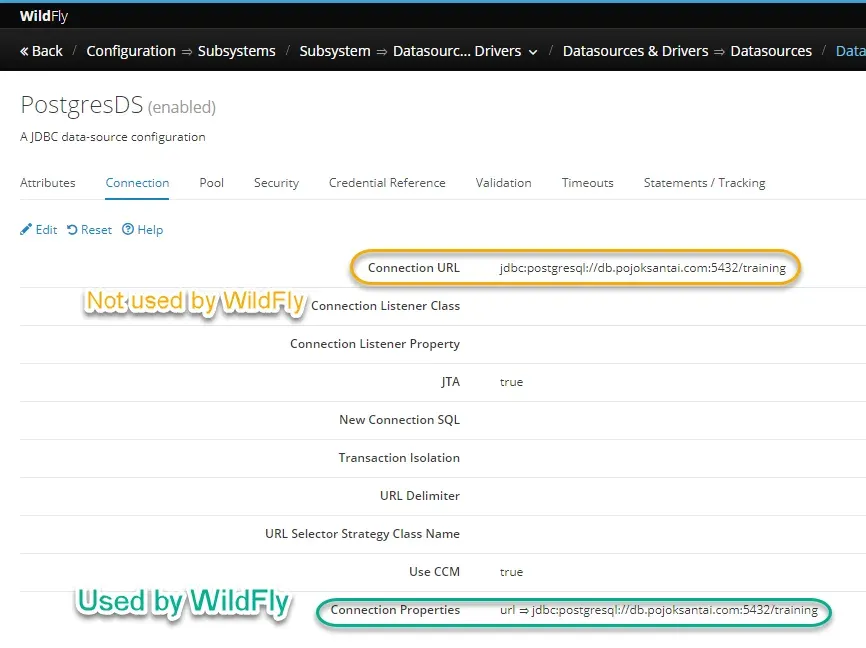
<datasource-class>org.postgresql.ds.PGSimpleDataSource</datasource-class>WFLYJCA0047: Connection is not validWith a datasource-class, WildFly configures the connection through the data source’s properties and ignores the Connection URL. Either remove datasource-class and keep <connection-url>, or set the URL as a connection property named url. In the management console this is under Configuration > Subsystems > Datasources & Drivers > Datasources, on the datasource’s Connection tab. The screenshot below shows the difference: the Connection URL field is not used, the url entry under Connection Properties is. Only then does WildFly connect to the right database server.
Connect WildFly to MySQL
Install the MySQL driver as a module
Download MySQL Connector/J, for example mysql-connector-java-8.0.21.jar. From version 8.0.31 the JAR is called mysql-connector-j-<version>.jar. Following the advice above, create the module directory [WILDFLY_HOME]/modules/com/mysql/driver/main and copy the JAR into it.
Create module.xml in the same directory, with the file name of your JAR in resource-root:
<?xml version="1.0" encoding="UTF-8"?><module xmlns="urn:jboss:module:1.8" name="com.mysql.driver"> <resources> <resource-root path="mysql-connector-java-8.0.21.jar" /> </resources> <dependencies> <module name="javax.api" /> <module name="javax.transaction.api" /> </dependencies></module>Add the datasource
A datasource can be added in three ways: in the management console (Configuration > Subsystems > Datasources & Drivers, as in the screenshot above), by editing the server configuration XML, or with the CLI.
In the XML, the MySQL datasource and driver follow the same pattern as the PostgreSQL example above:
<datasource jndi-name="java:jboss/datasources/MySqlDS" pool-name="MySqlDS"> <connection-url>jdbc:mysql://localhost:3306/dbname</connection-url> <driver>mysql</driver> <security user-name="dbuser" password="secret"/></datasource><drivers> <driver name="mysql" module="com.mysql.driver"> <driver-class>com.mysql.cj.jdbc.Driver</driver-class> </driver></drivers>