Java
Core Java reference: parameters and arguments, modifiers, primitive types, collections, jwebserver, streams and OOP concepts.
7 min readUpdated
A compact reference for core Java: the vocabulary of classes and methods, access and non-access modifiers, primitive types, how to pick a collection, the built-in static web server, a Stream API grouping example and the four OOP concepts with short examples.
Parameters, arguments and fields
The class below has two fields and one method with three parameters. Calling the method passes three arguments.
public class TestClass {    private final String param4 = "4";    private final int param5 = 5;
    public String test(String param1, int param2, int param3) {        return param1 + (param2 + param3 + param4);    }
public static void main(String[] args) { TestClass testClass = new TestClass(); String output = testClass.test("test", 1, 2); System.out.println(output); }}param1,param2,param3are parameters (formal parameters): placeholders in the method declaration."test",1,2intestClass.test("test", 1, 2)are arguments (actual parameters): the values passed in the call.param4,param5are fields (attributes) of the class.
The program prints test34. Inside the parentheses, param2 + param3 is evaluated first as an integer (3); adding the string param4 turns it into "34", which is then appended to "test". param5 is not used.
Modifiers
- Access modifiers control who can see a class or member.
- Non-access modifiers add other behaviour, such as inheritance rules or thread safety.
Access modifiers
Top-level classes can be public or have no modifier (package-private):
public: accessible from any other class.- default (no modifier): accessible only from classes in the same package.
Nested classes, fields, methods and constructors can use any of the following:
public: accessible from all classes.protected: accessible in the same package and from subclasses.- default (no modifier): accessible only in the same package.
private: accessible only within the declaring class.
Non-access modifiers
For classes:
final: the class cannot be extended.abstract: the class cannot be instantiated; a subclass must extend it.
For fields and methods:
final: a field cannot be reassigned after initialization; a method cannot be overridden.static: the field or method belongs to the class rather than to an instance.abstract: methods only, and only in an abstract class or interface. The method has no body, for exampleabstract void run();; a subclass provides it.transient: fields only. The field is skipped when the object is serialized.synchronized: methods only. One thread at a time can run the method on the same object (or on the class, for astaticmethod).volatile: fields only. Every read sees the latest write by any thread; the value is not cached per thread.
Primitive types
Fields of a primitive type get the default value below; local variables have no default and must be assigned before use.
| Type | Size | Default |
|---|---|---|
byte |
8 bits | 0 |
short |
16 bits | 0 |
int |
32 bits | 0 |
long |
64 bits | 0L |
float |
32 bits | 0.0f |
double |
64 bits | 0.0d |
char |
16 bits | '\u0000' |
boolean |
1 bit of information; storage size not specified | false |
Choose a collection class
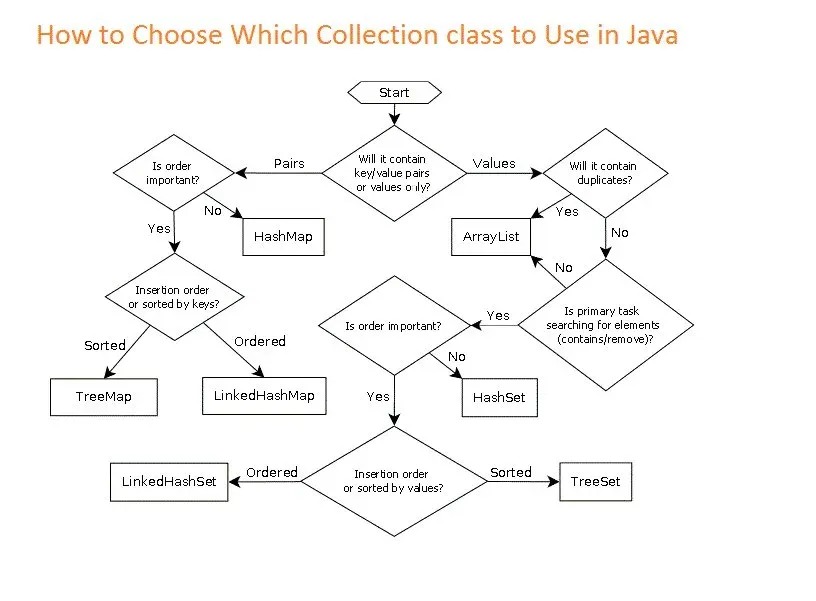
The flowchart below picks a collection by asking whether you store key/value pairs or single values, whether duplicates are allowed, whether lookup is the main task and whether order matters. For pairs, use HashMap without ordering, LinkedHashMap for insertion order and TreeMap for sorted keys. For values, use ArrayList when duplicates are allowed or lookup is not the main task; otherwise HashSet, LinkedHashSet or TreeSet by the same ordering rule.
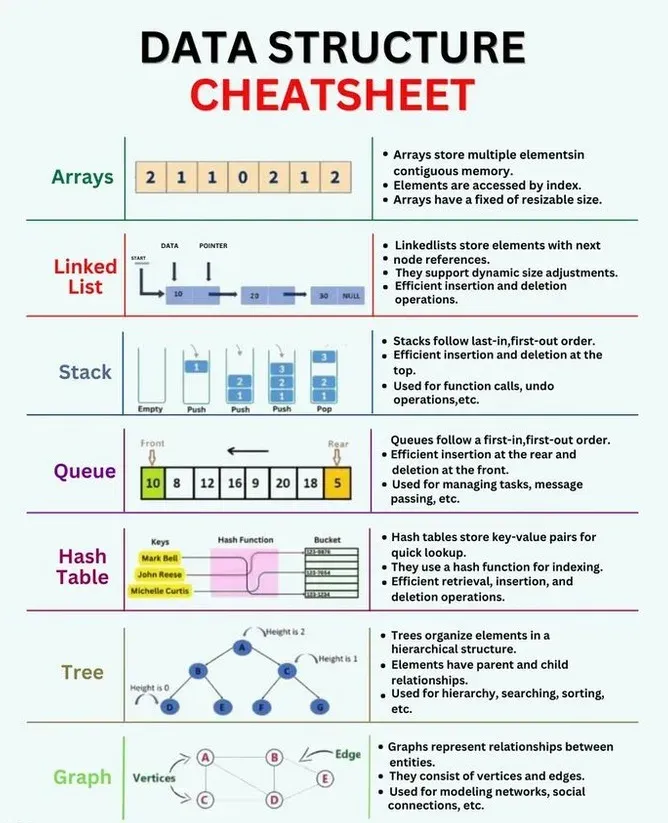
The cheat sheet below summarises the underlying data structures: arrays, linked lists, stacks (last in, first out), queues (first in, first out), hash tables, trees and graphs.
Serve static files with jwebserver
Java 18 added a minimal web server (JEP 408) that serves static files from a directory. It is meant for testing, prototyping and ad hoc file sharing, not production. Run it in the directory you want to serve:
jwebserverBy default it binds to the loopback address on port 8000 and serves the current directory. To choose the port and directory, start the same server through its module:
java -m jdk.httpserver -p 8080 -d /tmp/java-p sets the port and -d the directory to serve, which must be an absolute path. jwebserver accepts the same options.
Group a stream by month
Collectors.groupingBy with a TreeMap factory groups records by month and keeps the months sorted. This example sums the calories of meals, where each meal has a mealtime (LocalDateTime) and calories (int):
Map<YearMonth, Integer> caloriesByMonth = meals.stream() .collect(Collectors.groupingBy(m -> YearMonth.from(m.mealtime), TreeMap::new, Collectors.summingInt(m -> m.calories)));The first argument is the grouping key, the second creates the map, and the third reduces each group.
OOP concepts
Inheritance
- Inheritance passes the fields and methods of a parent class to a child class.
- It lets you reuse tested code and add features to an existing class without modifying it.
- In Java, a class inherits with the
extendskeyword.
In this example SubClass uses a field and method it inherited from SuperClass:
class SuperClass {    String superClassField = "Super_Class_Field";
    void superClassMethod() {        System.out.println("Super_Class_Method");    }}
class SubClass extends SuperClass {    String subClassField = "Sub_Class_Field";
    void subClassMethod() {        System.out.println("Sub_Class_Method");    }}
public class JavaOOPConcepts {    public static void main(String[] args) {        SubClass subClass = new SubClass();
        subClass.subClassMethod();        System.out.println(subClass.subClassField);
        // SuperClass members are inherited by SubClass        subClass.superClassMethod();        System.out.println(subClass.superClassField);    }}
Abstraction
- Abstraction separates what something does from how it is done.
- A class or interface declares the operations; subclasses implement them as they need.
- In Java, abstraction is expressed with abstract classes and interfaces.
An abstract class declares a method without a body, and each subclass implements it:
abstract class AbstractClass {    abstract void anIdea();}
class SubClassOne extends AbstractClass {    @Override    void anIdea() {        System.out.println("An idea is implemented according to SubClassOne requirement");    }}
class SubClassTwo extends AbstractClass {    @Override    void anIdea() {        System.out.println("An idea is implemented according to SubClassTwo requirement");    }}
An interface does the same; implementing methods must be public:
interface Idea {    void anIdea();}
class ClassOne implements Idea {    @Override    public void anIdea() {        System.out.println("An idea is implemented according to ClassOne requirement");    }}
class ClassTwo implements Idea {    @Override    public void anIdea() {        System.out.println("An idea is implemented according to ClassTwo requirement");    }}
Polymorphism
Polymorphism (“many forms”) means one name can stand for different behaviour. Java has two kinds:
- Static (compile-time) polymorphism: the compiler picks the method or constructor from the argument types. Method and constructor overloading are the examples. Java has no user-defined operator overloading; the built-in
+, which adds numbers and concatenates strings, is the usual example of an overloaded operator. - Dynamic (run-time) polymorphism: the method that runs depends on the object’s actual class. Method overriding is the example.
Overloading, with + used both ways:
class AnyClass {    int i;    String s;
    // Constructor overloading    public AnyClass() {        this.i = 1;        this.s = "";    }
    public AnyClass(int i, String s) {        this.i = i;        this.s = s;    }
    // Method overloading    void anyMethod(int i) {        System.out.println(i + this.i); // '+' adds two numbers    }
    void anyMethod(String s) {        System.out.println(s + this.s); // '+' concatenates two strings    }}
Overriding: the variable’s type is SuperClass, but the call runs the method of the object it refers to:
class SuperClass {    void superClassMethod() {        System.out.println("Super_Class_Method");    }}
class SubClass extends SuperClass {    @Override    void superClassMethod() {        System.out.println("Super_Class_Method_Is_Overridden");    }}
public class JavaOOPConcepts {    public static void main(String[] args) {        SuperClass superClass = new SuperClass();        superClass.superClassMethod(); // Super_Class_Method
        superClass = new SubClass();        superClass.superClassMethod(); // Super_Class_Method_Is_Overridden    }}
Encapsulation
- Encapsulation bundles data and the operations on that data into one unit, the class.
- It also hides the internal state (data hiding): fields are
privateand accessed through public getters and setters, which can validate or change the representation later.
class Customer {    private int custID;    private String name;    private String address;
    public int getCustID() {        return custID;    }
    public void setCustID(int custID) {        this.custID = custID;    }
    public String getName() {        return name;    }
    public void setName(String name) {        this.name = name;    }
    public String getAddress() {        return address;    }
    public void setAddress(String address) {        this.address = address;    }}
For immutable data carriers, a record (Java 16 and later) generates the fields, accessors, equals() and hashCode() for you.
Create an RGBA colour
java.awt.Color accepts a packed ARGB int when the second argument (hasalpha) is true. Bits 24 to 31 hold alpha, 16 to 23 red, 8 to 15 green and 0 to 7 blue.
Color white = new Color(0b11111111111111111111111111111111, true); // opaque whiteColor halfRed = new Color(0x80FF0000, true); // red at about 50% opacityHexadecimal is easier to read: each pair of digits is one channel, in the order alpha, red, green, blue.